Node.js와 연동 시 Authentication method 에러 발생
✒️ 2025-05-28 16:04 내용 수정
-
참고 자료 : Inflearn nodejs와 mysql 연동 에러
-
그 외에 해당 에러를 검색했을 때 나오는 국내외 수 많은 글 들..(에러를 수정하는데 오래 걸렸고, 외부에서 검색하다 보니 Chrome 게스트 모드를 사용해서 방문 기록이 남지 않았다.)
-
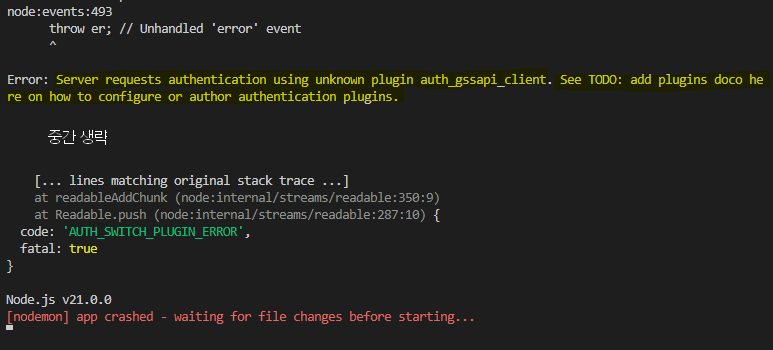
에러가 난 상황 : MySQL 8.0.36 버전과 Node.js 20.11.0 버전을 연동할 때 Authentication Method 관련 문제가 발생했다.
-
에러 사진
- 가장 맨 처음 오류도 auth_gssapi_client 오류였으나, code 부분이 플러그인이 없거나 지원 안된다는 내용이었던 것으로 기억한다.
- 이 부분은 VSC에서 mysql2로 다시 설치했더니 해결되었지만 사진과 같은 에러로 바꼈다.
-
구글링해서 나온 방법은 caching_sh2_password 에러가 많았는데, 내가 겪은 오류 코드는 auth_gssapi_client여서 여러 방법을 시도해도 해결이 되지 않았다.
- caching_sh2_password 오류의 원인은 MySQL에 새 Authentication을 추가했지만, Node.js에서 아직 해당 방법을 지원하지 않아 발생한다고 한다.
- 상세한 설명은 2번째 참고 자료의 2번째 답변(Summary) 참고.
-
개개인 설정마다 에러 발생 원인이 다를 수 있기 때문에 MySQL 재설치하기 전에 위의 참고 자료와 아래의 방법들을 먼저 하나씩 시도해보는 것을 권장한다.
- VSC 터미널에서 mysql 라이브러리 대신 mysql2 설치하기
- server.js 등 서버 파일에서 접속할 데이터베이스의 정보를 설정할 때 MySQL의 포트번호 추가하기(기본 3306)
- MySQL Workbench에서
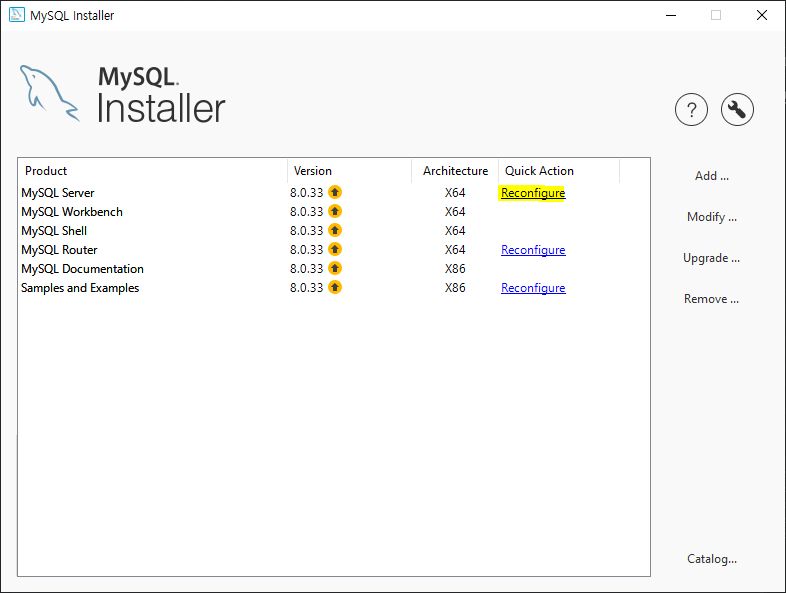
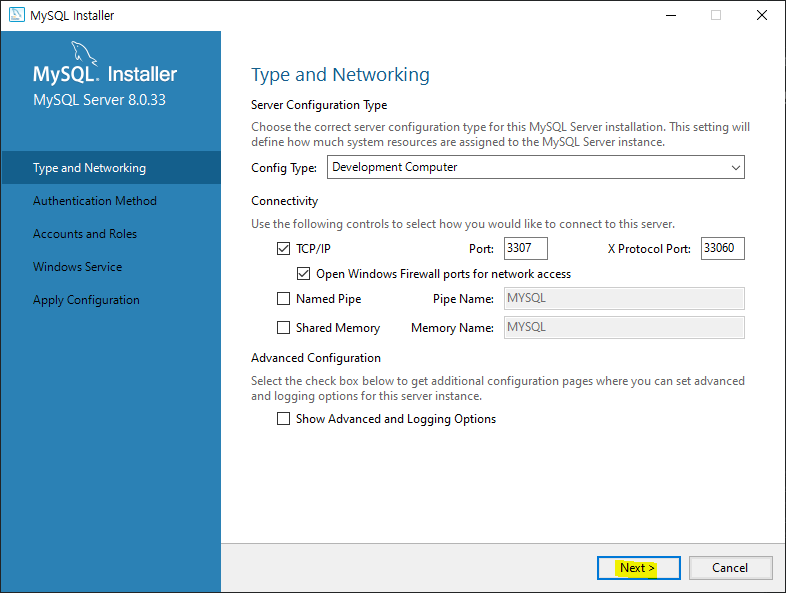
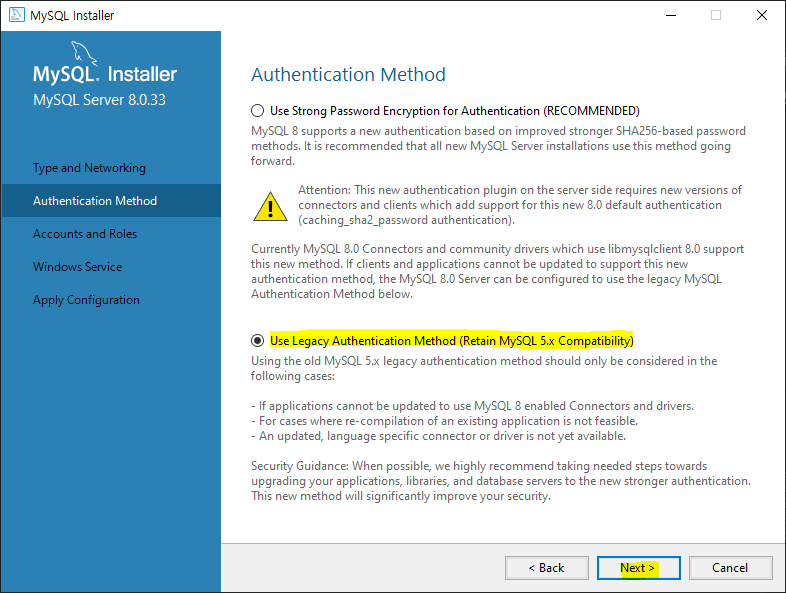
ALTER USER 'root'@'localhost' IDENTIFIED WITH mysql_native_password BY '비밀번호';실행 - 작업 표시줄에서 MySQL Installer - Community를 검색해서 실행한 후, MySQL Server의 Reconfigure에 들어가서 Authentication Method를 legacy(2번째 옵션)으로 변경하기
- C:\ProgramData\MySQL\MySQL Server 8.0 폴더에 있는 my.ini (윈도우 기준) 파일에
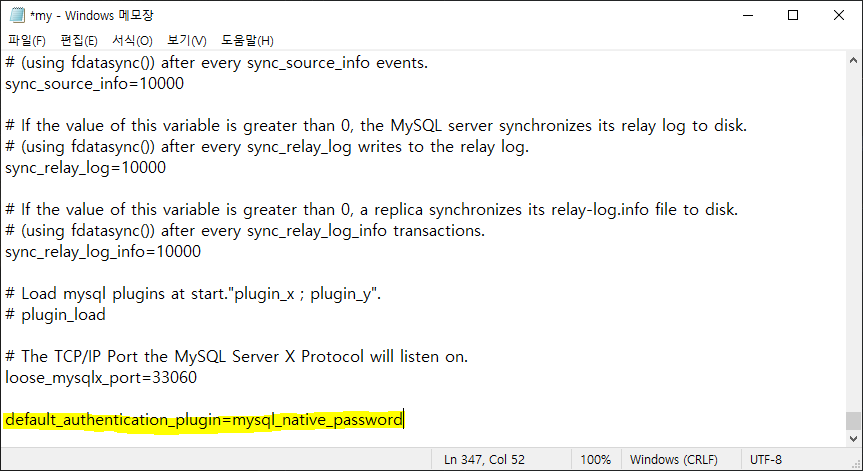
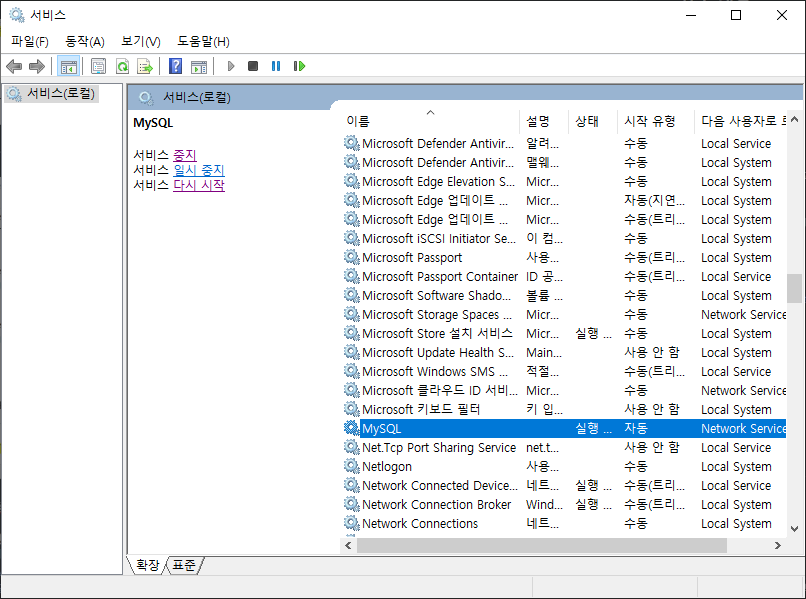
default-authentication-plugin=mysql_native_password를 추가 후 저장한 다음 MySQL 서버 재시작하기
-
MySQL을 8.0.28 버전로 다시 재설치할 때 Authentication method를 legacy(2번째 옵션)으로 변경해서 설치했는데 이 버전으로도 해결되지 않았다.
-
여러 방법을 시도했으나 결국 MySQL을 8.0.33 버전으로 재설치, 설치 과정에서 MySQL의 Authentication Method를 Legacy(2번째 옵션)으로 설정, Node.js에서 mysql2 라이브러리 설치 과정을 거친 후에야 해결되었다.
2-1. Node.js에서 mysql 라이브러리 대신 mysql2 설치
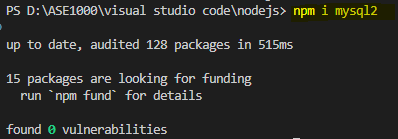
- VSC 터미널에서
npm un mysql로 설치 되어있던 mysql을 먼저 삭제한다. npm i mysql2으로 mysql2를 설치한 후 다시 DB와 연결을 시도한다.
2-2. Node.js에서 연동 시 MySQL의 포트 번호 추가
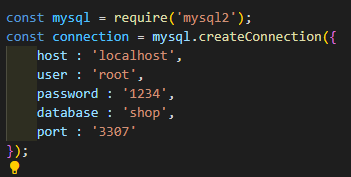
- 서버 설정 js 파일에서 connection 객체에 port property를 추가한다.
const mysql = require('mysql2');
const connection = mysql.createConnection({
    host : 'localhost',
    user : 'root',
    password : '비밀번호',
    database : 'DB이름',
    port : '3306' // port 번호 추가
});
- 사용하던 MySQL의 포트를 3307로 사용하고 있어서 3307로 설정했다. 기본값은 3306이며, MySQL을 설치했을 때 포트번호(MySQL workbench에서도 확인 가능)를 입력한다.
2-3. Authentication Method 변경
- 1번, 2번, 3번 중에 하나를 선택해서 진행한다.
- 오류를 수정할 때 각각의 방법으로도 해결되지 않아 다 시도해봤지만 해결이 안됬다.
1. MySQL Workbench에서 쿼리문 실행
- MySQL Workbench에서 쿼리문을 실행해서 특정 사용자의 Authentication method를 변경한다.
ALTER USER 'root'@'localhost' IDENTIFIED WITH mysql_native_password BY '비밀번호';

-- 위 쿼리문 실행 후 적용하려면 반드시 flush를 해야 함
FLUSH privileges;

SELECT Host, User, plugin, authentication_string FROM mysql.user;
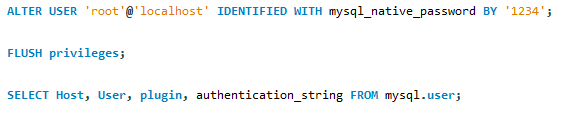
- 쿼리문이 적용된 사용자의 plugin이 변경되었는지 확인한다.

2. MySQL Installer에서 Authentication Method 변경
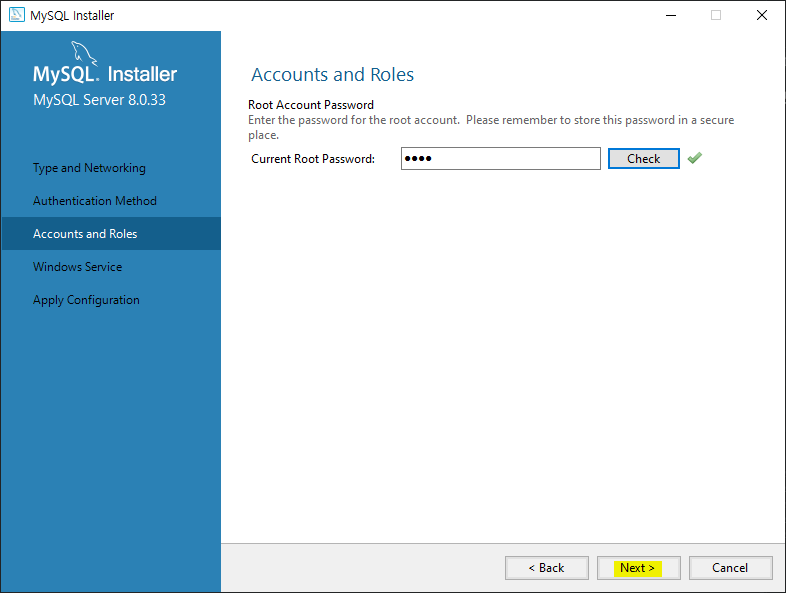
- MySQL Installer - Community를 검색해서 실행한 후, MySQL Server의 Reconfigure에 들어가서 Authentication Method를 legacy(2번째 옵션)으로 변경하기
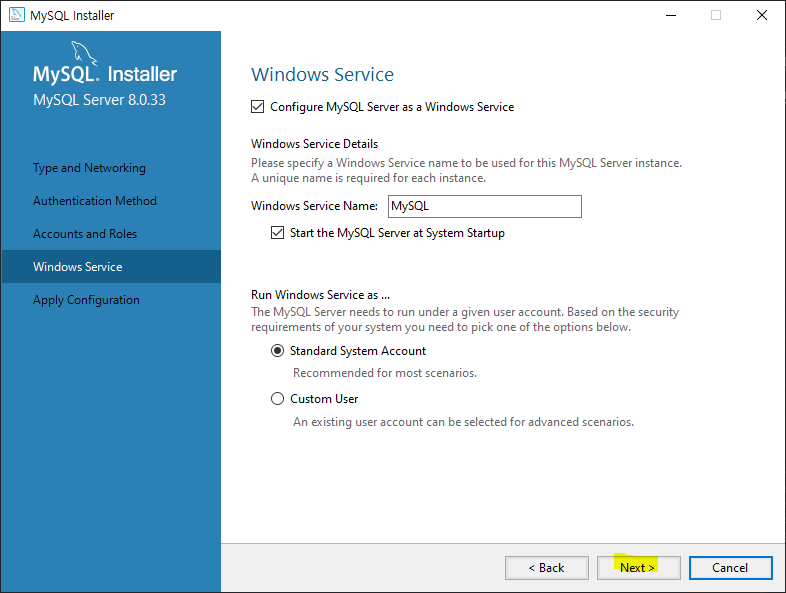
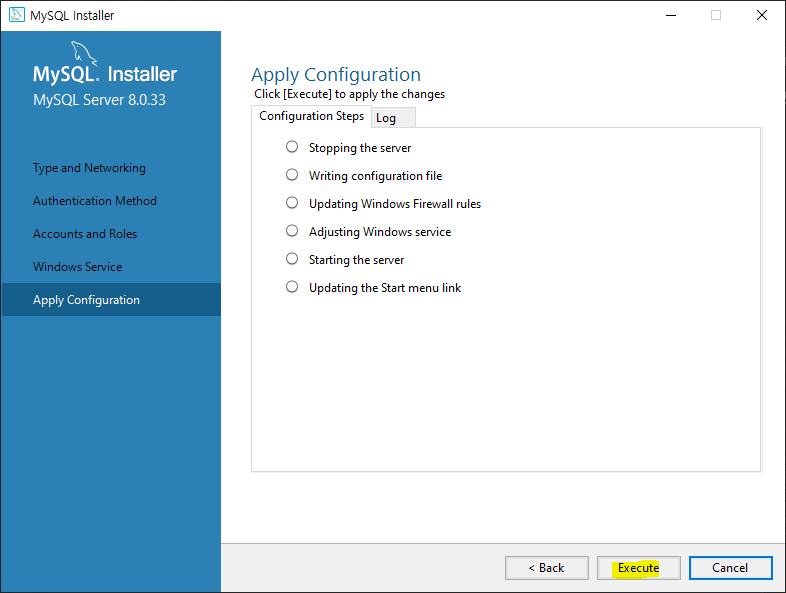
3. MySQL의 my.ini 파일에 구문 추가
- 참고 자료 : 가비엘's Mysql 로그인 시인증메서드 미지원 오류
- window 기준으로 작성했다.
- C:\ProgramData\MySQL\MySQL Server 8.0 위치로 이동해서 my.ini 파일을 찾는다.
- 윈도우에선 C: 드라이브 내의 ProgramData는 숨겨진 항목으로 설정되어 있어 파일 탐색기 메뉴의 보기 - 숨긴 항목을 체크하면 표시된다.
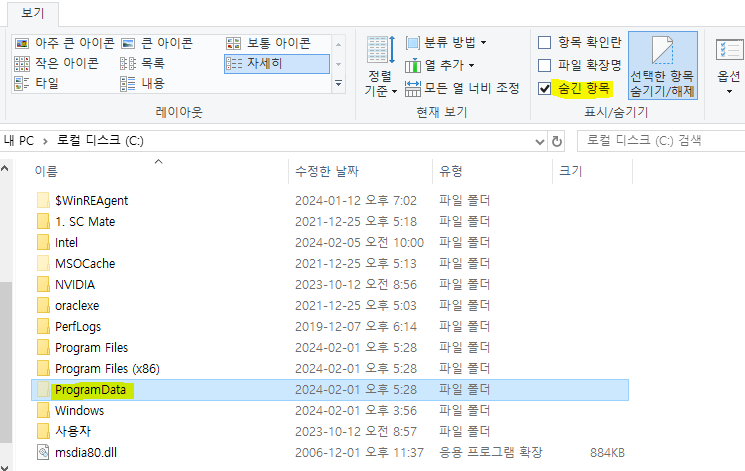
- 윈도우에선 C: 드라이브 내의 ProgramData는 숨겨진 항목으로 설정되어 있어 파일 탐색기 메뉴의 보기 - 숨긴 항목을 체크하면 표시된다.
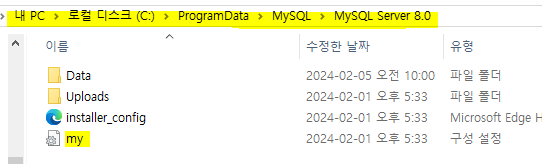
- my.ini 파일을 메모장으로 열고,
default_authentication_plugin=mysql_native_password를 맨 아랫줄에 추가한다.
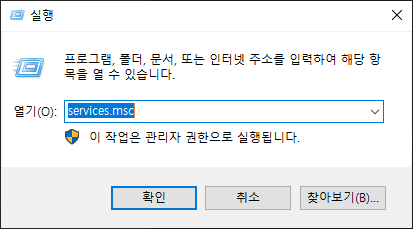
- 작업 표시줄의 윈도우 마크에서 우클릭 - 실행 - services.msc를 검색해 실행한 후 MySQL 서버를 재시작한다.
2-4. MySQL 8.0.33 버전으로 재설치
- 기존에 설치된 버전이 8.0.36 버전이고, 위의 방법들로 해결이 안되었다면 8.0.33 버전으로 다시 설치한다.
- 설치 전에 MySQL 제거로 관련 프로그램과 파일을 모두 제거한다.
- 설치는 MySQL 설치#8.0.33 버전(Node.js 연동 성공)을 참고하여 진행한다.